


 客戶服務
客戶服務


- 同類別
- 同品牌
- 同價位
商品介紹
- 商品名稱:CASIO CLASSPAD II FX-CP400 科學型計數機
- 商品編號:OL007017
- 品牌:CASIO
- 上架時間:2015-04-26
- 商品淨重:0克
ClassPad II fx-CP400
Support your classroom with technology
∗ Comes with snap-on hard case
Plastic keys
Natural textbook display
List based STAT-data editor
Multi-replay
10 + 3 digits
Color display
Icon menu
Dot matrix display
Data communication with a personal computer
Features
Vivid Color Display and Touch Panel for Superb Usability
Horizontal Screen View
Display long formulas on a single line.
Beautiful 4.8-inch color display
Formulas, graphs, and other graphics are sharp and clear.
©Phillip Minnis-Fotolia.comThe display has resolution of 320 x 528 pixels (more than 65,000 colors), 4.4 times higher than ClassPad 330 PLUS.
Pen-touch Operation
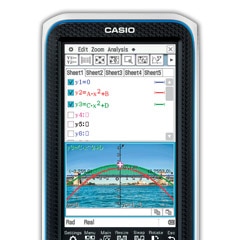
Quickly and easily create graphs using drag and drop.
Simple interface
The fx-CP400 has simple, easy-to-understand menu icons, menu bars, and toolbars and an interactive interface.
Main menu
Toolbar
Menu bar
Interactive interfaceTouch-panel operation by stylus or finger
The fx-CP400 offers intuitive stylus touch-panel operation that eliminates complicated key operations. Graphically display mathematical formulas by simply dragging and droppingthem into the graph area.
Create a graph by selecting a formula
and using drag and drop.Brand-new software keyboard
The fx-CP400 supports learning of basic functions usedby everyone, such as fractions, square roots,and trigonometric functions, advanced functions likedifferential calculus, complex compound numbers, andsigma calculations, as well as highly advancedcalculations such as piecewise and user-defined formulas.Computer Algebra System (CAS)
Laplace transforms
Fourier transformsThe CAS supports everything from Expand, Factor, Solve, and other basic commands to advanced commands like Fourier and Laplace transforms.
eActivity application
An eActivity is like a digital worksheet that can be created andworked with on the fx-CP400. All of the powerful features andcapabilities of the fx-CP400 can be incorporated into aneActivity. In addition to performing the same calculations asthe Main application, an eActivity will accept text entry, justlike a word processor. Graphs, as well as Geometry andSpreadsheet data, can be stored in an eActivity file.
Graph & Picture
The calculator comes pre-loaded with visuals such as a single image (still image) of the curve of an arched bridge. The use of real-life visuals as background images for functionssuch as the drawing of graphs overlaid on color images makes mathematics learning a more visually familiar experience.
Select the formula for the graph you want to create.
A graph screen with a visual appropriate for creating a graph of the selected function is displayed.
Congratulations! Your graph is complete.
Change the graph by repeatedly changing coefficient to create a graph that visually matches the parabola.C2P files — Single images
Plotted C2P files can be used in Graph & Table, eActivity, Conics, Sequence, and Statistics.
©styf - Fotolia.com
©Phillip Minnis - Fotolia.com
©spinskin - Fotolia.com
©Steve Beckle - Fotolia.com
©Olivier G - Fotolia.com
©Juha-Pekka Kervinen - Fotolia.com
More than 40 pictures are pre-loaded on the fx-CP400!
Graphing function
Display formulas and related graphs in the same color and highlight graphcharacteristics by displaying scale marks, grids, and coordinate values. The vivid colordisplay of the fx-CP400 improves the visibility of graphs and formulas.
Area of inequality shading,
grid lines, numbers on axes
A different color for
each graph and figure
∫dx intersectionGeometry
Students can learn general theorems by drawing figures. Dropping a geometricfigure into the Main application window will produce the numerical data for thefigure. An Animation function enables students to move geometric figures drawn onthe screen. The fx-CP400 supports drawing of conics using a focus.
Geometric graphing
Geometric graphing using drag & dropSpreadsheet application
Collected data can be organized and tabulated for analysis after statistical graphingis complete. Spreadsheet data also can be used in table calculations. In addition, thefx-CP400 supports the following functions: search, sort, data import from and exportto lists, matrices, and variables, CellIf, and Histogram/Box-whisker graphing.Color Link
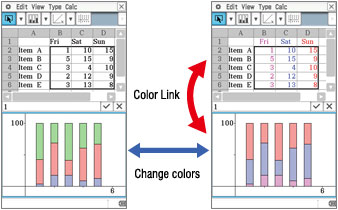
The fx-CP400 features the Color Link function, which automatically links colors specified on the spreadsheet screen with colors used in graphs to support learning of functions by enabling visual confirmation of changes in values or trends.
Use Color Link to link the color of text and graphs.Differential Equation Graph application
The solution set of a differential equation can be represented graphically as a vectorfield, and solution curves can be drawn by providing initial conditions for theequation. First, second, and n-th order differential equations are supported.Financial application
This fx-CP400 application provides a total of 15 different financial calculations,including simple/compound interest, cash flow, amortization, depreciation, bondcalculation, and operating/financial leverage.
Specifications
ALGEBRA
- CAS (Computer Algebra System)
- Algebra Assistant
- Fractions
- Transformation (simplify, expand, factor)
- Function graphing, polar, parametric and x = f (y) equations
- Numeric evaluation of functions in tables
- Graph solve (root, max, intersection, inflection, distance)
- Conics graphs (Parabola, Circle, Ellipse, Hyperbola, General figure)
- Conics graph solve (Focus, Vertex, Directrix, Symmetry, Center, Radius)
- Recursive and explicit sequence numerical tables and plots
- Number Base (base 2 (Bin), 8 (Oct), 10 (Dec) and 16 (Hex))
- Laplace transform, Fourier transform, Fast Fourier transform (FFT)
CALCULUS
- Hyperbolics
- Integration, Differential
- Differential equation
- Σ, ∏, lim
- Dirac Delta, Heaviside Unit Step, Gamma
STATISTICS
- Statistical plot (Scatter Plot, xyLine, Normal Probability Plot, Histogram, Box-whisker plot)
- Statistical regression graphs
GEOMETRY
eACTIVITY APPLICATION
HARDWARE
- Data communication (via USB and 3-pin cables)
- USB cable for connecting with PC
- 3-pin cable for connecting with other ClassPad unit or EA-200
OTHER USEFUL FEATURES
- Graphing function
- Drag & drop
- Natural format input of equations and expressions
- Natural format display of results
- Math, Alphabet, 2D soft keyboards
- Command catalogue soft keyboard
- Shift key configuration
- Calculation History
- Mantissa + exponent: 10 + 3
- Interactive manipulation for solving equations
- Differential equation graphs
- Numeric equation solver
- Financial calculations
- Icon menus
- Full screen display/Split screen display
- Software upgradeability (maintenance, feature upgrades)
- User-defined variable
- User-defined function (extends built-in functions)
- Folder-based memory management
- Resetting/Initializing memory
- Selectable display language
- Auto Power Off (APO)
- Bundled Screen Receiver Software
- Ending Screen/User-defined Ending Screen
- Graph & Picture
- Horizontal screen view
- Length unit
OPTIONS
- ClassPad Manager (FA-CP400A/B)
- EA-200 Data Analyzer
∗ For information on supported models, refer to the following URL:
http://edu.casio.com/support/projector/






用戶評論(共0條評論)
- 暫時還沒有任何用戶評論
- 暫時沒有用戶諮詢